Online Password Generator: Why Client-Side Generation Protects Your Privacy
In an age where digital data breaches make headlines almost every week, how you create your passwords matters more than ever. You might think that using any random string of characters is enough to keep you safe. However, the method you use to create those strings is often the hidden weak point in your security strategy. Have you ever wondered where your generated password actually comes from?
Most people use basic online tools without realizing that many of them process data on a remote server. This means your "secret" password exists on someone else’s computer before it ever reaches yours. This guide explores why client-side password generation is the gold standard for your digital life. We will explain how tools like our online password generator use advanced technology to ensure your sensitive data never leaves your own device.
As you've seen in this guide, client-side password generation offers real privacy advantages that traditional tools can't match. Whether you are protecting a personal social media account or a high-stakes corporate database, using a high-quality secure password generator makes all the difference.
Understanding Client-Side vs. Server-Side Password Generation
To appreciate true digital privacy, you must first understand the "where" of password creation. In the world of web development, there are two main places where a calculation can happen: the server or the client. The server is a remote computer owned by the website provider. The "client" is your own device, such as your laptop, smartphone, or tablet.
A truly secure generator should use a strong source of randomness, known as entropy, and ensure that the generated data is never shared with a third party. When you use an online password generator, the location of the generation process determines how much trust you must place in the provider. If the generation happens on a server, you are relying on the provider's honesty and their ability to defend against hackers. If it happens on your client device, you are in total control.
How Server-Side Password Generators Work and Their Privacy Risks
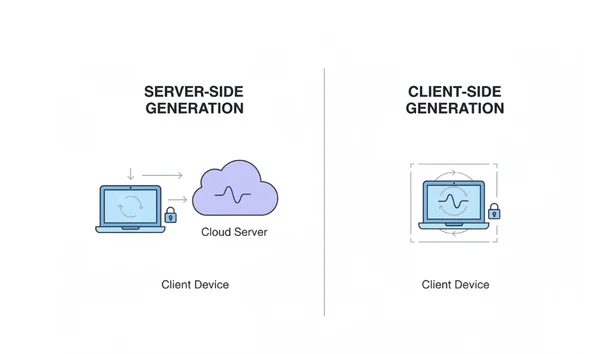
A server-side generator works like a traditional mail-order service. When you click "generate," your browser sends a request across the internet to a remote server. That server runs a script, creates a password, and sends it back to you.
Server-based generators may seem quick, but they come with hidden risks. For example, many servers automatically log every request. Your password could end up stored in plain text on their servers without you ever knowing. Additionally, there is the "man-in-the-middle" risk. Even with encryption, any data traveling across the internet is more vulnerable than data that stays on your local machine.
Crucially, client-side generation protects you against server breaches. In a server-side system, if the generator’s server is hacked, the logs of your generated passwords could be stolen. In a client-side system, there is no "treasure chest" of passwords for a hacker to find. Since the server never receives your password, a breach of the website's server would not reveal any of your sensitive information.
The Technical Advantage of Client-Side Processing
Client-side generation flips the script by using your own browser’s processing power. When you use a client-side password generator, the code required to create a password is downloaded to your browser once. From that moment on, all the "heavy lifting" happens locally.
Client-side tools use your browser's resources to create mathematically unpredictable passwords. Since no data leaves your device, there's no risk of your password being intercepted or logged on a remote server. This approach effectively eliminates the middleman, making it the most secure password generation method available today.
Technical users can verify this by opening their browser’s "Developer Tools" and checking the "Network" tab. When you click generate on a verified client-side generator, you will see that no new network requests are sent to a server. The password appears instantly because the code is already running locally on your computer.
The Privacy Architecture of Our Secure Tool
The philosophy behind our tool is simple: what we don't know, we can't lose. We believe that your security should not depend on our promises, but on the very way the tool is built. By using a "Privacy-First" architecture, we ensure that your most sensitive information remains exactly where it belongs—with you.
Our system is designed to provide maximum customization without sacrificing a single bit of privacy. You can adjust the length, include special symbols, or choose easy-to-remember passphrases, all while remaining completely offline in terms of data transmission.
Zero-Data Collection: What We Never See or Store
On our platform, "Zero-Data" is not just a marketing slogan; it is a technical reality. Our servers are configured to deliver the website files to your browser, and that is it. We do not track which passwords you generate, how long they are, or which accounts you use them for.
You should only trust online generators that explicitly state they do not store or transmit your data. To be safe, use a privacy-focused password generator which is built specifically to protect your privacy by keeping everything local. Even the "Password History" feature on our site is built with this philosophy in mind. If you see a list of your recently generated passwords, that list is stored only in your browser's local memory (Local Storage).
As soon as you clear your browser data or close the specific session settings, that history vanishes. We never see it, we never store it, and we could not give it to anyone even if we were asked.
How Your Browser Becomes a Secure Password Factory
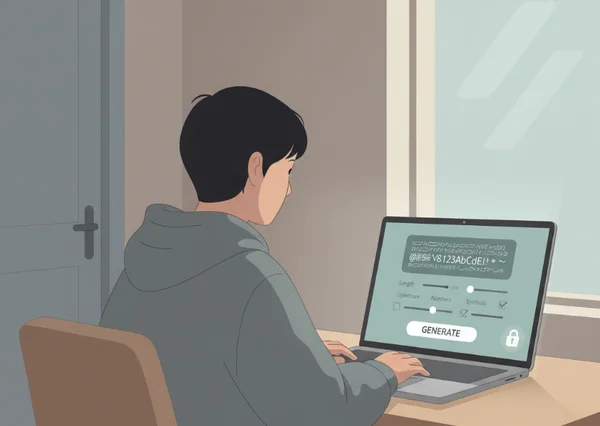
Think of your web browser as a high-tech, private factory. When you load our page, you are essentially installing a temporary machine that builds security keys. Here is how the process works:
- Selection: You choose your settings, such as using a "Random" mode or a "Memorable" passphrase.
- Execution: When you click the "Generate" button, a local JavaScript function runs. It pulls "entropy" from your computer’s hardware.
- Delivery: The password appears on your screen instantly. It is copied to your clipboard only when you decide.
The only minor requirement for this process is a modern web browser with JavaScript enabled. Since almost all modern internet browsing happens on such devices, this is rarely an issue. The benefits of absolute privacy and zero data storage far outweigh the need for a functioning browser. This method allows you to create secure passwords for any site without worrying about who might be watching the network traffic.
Real-World Privacy Scenarios: When Client-Side Generation Matters Most
While a strong password is important for a gaming forum, it is absolutely critical for high-value accounts. In certain scenarios, the "how" of your password generation can have massive financial or legal consequences. Using a client-side tool provides a layer of insurance that server-side tools simply cannot match.
Security professionals often recommend PasswordGenerator.vip specifically because it fits into a "Zero Trust" security model. You don't have to trust the tool developer; you only have to trust the logic of the code running on your own screen.
Handling Sensitive Accounts: Banking, Healthcare, and Government Portals
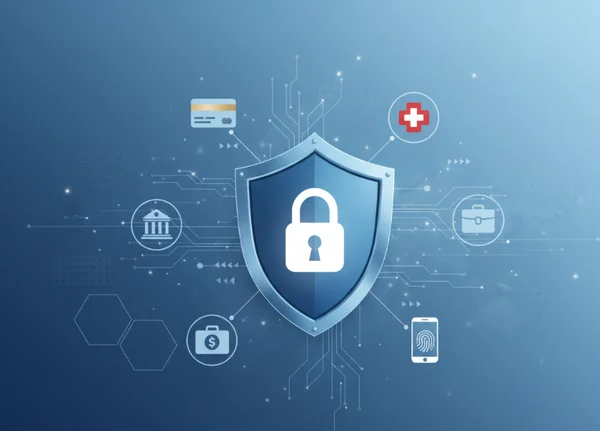
For accounts that contain your life savings or your medical history, "good enough" is not an option. Hackers specifically target banking and healthcare portals because the data is highly valuable on the dark web. If you use a server-based generator for these accounts, you are adding one more person (the website owner) to your circle of trust.
By using a client-side password generator, you ensure that the password for your bank account was born and raised on your own device. This is especially useful when creating long, complex codes that are 20 characters or more. It gives you the peace of mind that no record of your master password exists anywhere in the cloud.
Corporate Environments and Confidential Data Protection
In a business setting, a single compromised password can lead to a massive corporate data breach. IT managers and business owners must ensure that employees are not using weak passwords. However, they also need to make sure employees aren't using untrustworthy tools that might leak corporate secrets.
A browser-based tool is the perfect solution for corporate teams. It allows staff to generate a password that meets strict complexity requirements without violating company privacy policies. Since the tool operates entirely within the user's browser, it satisfies most internal security audits and data protection regulations like GDPR or HIPAA.
Your Privacy-First Password Generation Strategy
In today's increasingly connected world, keeping your accounts secure doesn't have to be complicated. The move from server-side to client-side generation is one of the easiest and most effective ways to upgrade your personal privacy. By choosing a tool that respects your data, you eliminate the risks of server logs, database leaks, and intercepted traffic.
To keep your accounts secure, focus on these key principles:
- Always prioritize tools that process your data locally on your device.
- Use high-entropy passwords (random characters) or long passphrases for maximum security.
- Never reuse the same password across different websites.
Take control of your digital footprint today. Whether you need a quick PIN or a complex 64-character code, try our free tool to experience the ultimate in private, secure, and client-side password generation. Your privacy is your right—make sure you use a tool that protects it.